
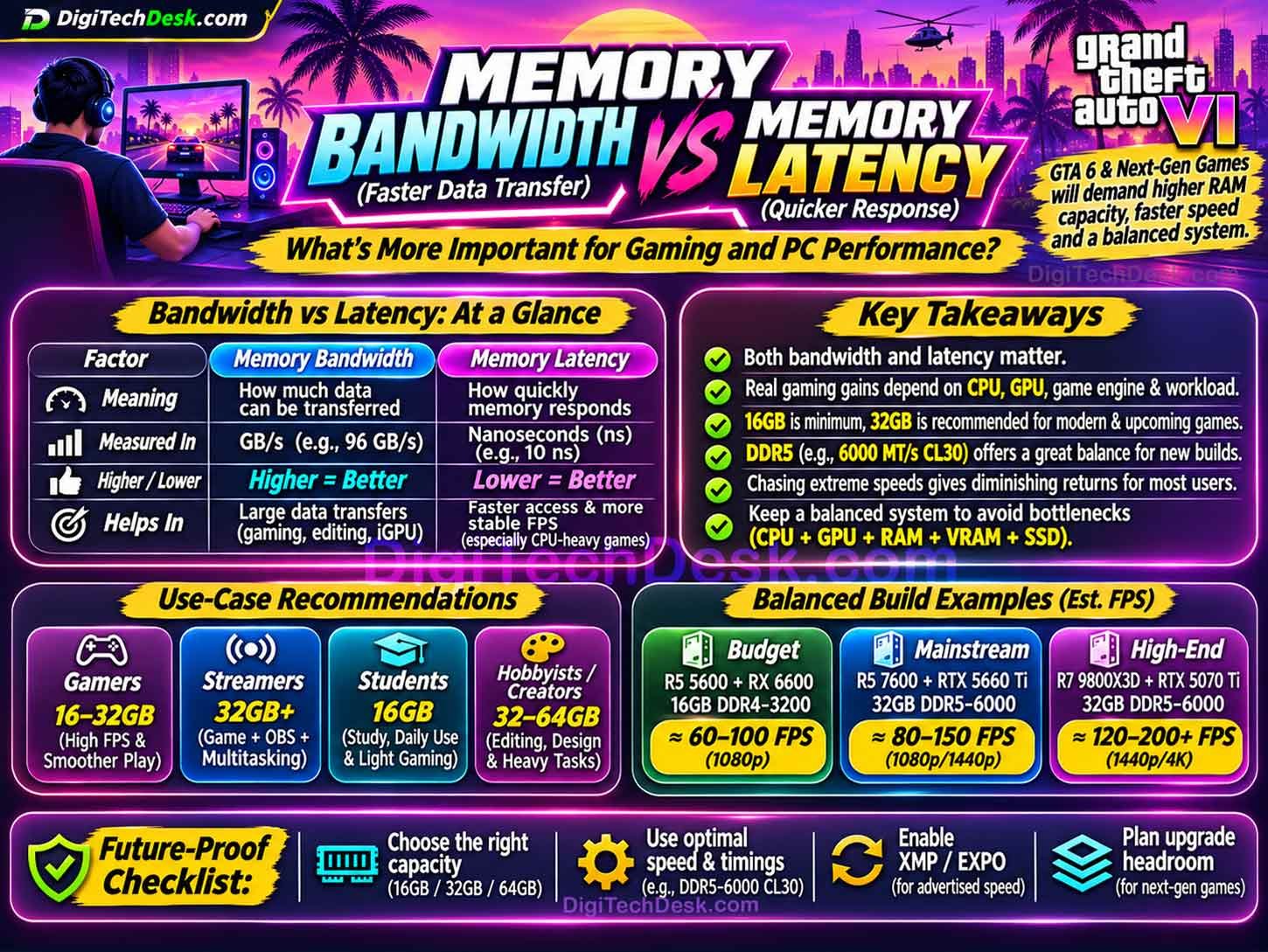
When comparing RAM, most buyers look at capacity (16GB or 32GB) and speed (3200MHz or 6000MHz). But two other specifications significantly influence memory performance: bandwidth and latency.
A RAM kit can offer high bandwidth but relatively high latency, while another kit may respond faster despite having a lower transfer rate. So which matters more for gaming, FPS, multitasking and future PC builds?
Let’s compare memory bandwidth vs memory latency, understand real-world gaming benchmarks, explore DDR4 and DDR5 configurations, and find out when paying extra for faster RAM is actually worthwhile.
1. What Is Memory Bandwidth?
Memory bandwidth refers to the amount of data RAM can transfer to and from the processor over a given period.
Think of memory bandwidth as a highway.
- A wider highway allows more vehicles to travel simultaneously.
- A higher transfer rate allows more data to move every second.
- More available bandwidth helps workloads that need to move large amounts of data.
Bandwidth is generally measured in GB/s (gigabytes per second).
For example:
| RAM configuration | Theoretical bandwidth |
|---|---|
| DDR4-2666 dual-channel | 42.7 GB/s |
| DDR4-3200 dual-channel | 51.2 GB/s |
| DDR4-3600 dual-channel | 57.6 GB/s |
| DDR5-4800 dual-channel | 76.8 GB/s |
| DDR5-5600 dual-channel | 89.6 GB/s |
| DDR5-6000 dual-channel | 96 GB/s |
| DDR5-6400 dual-channel | 102.4 GB/s |
These are theoretical peak figures for two 64-bit memory channels, not guaranteed application performance.
Why does bandwidth matter?
Higher memory bandwidth can help when a processor needs to transfer large amounts of data quickly.
It can benefit:
- Gaming, particularly CPU-limited scenarios.
- Integrated graphics.
- Video editing and rendering workloads.
- Large datasets.
- Compression and decompression.
- Scientific and technical applications.
- Heavy multitasking and memory-intensive workloads.
However, more bandwidth does not automatically mean more FPS.
A game that is limited by GPU performance may show very little improvement when you install faster RAM.
2. What Is Memory Latency?
Memory latency refers to the time taken for a memory operation to respond.
If bandwidth is the width of a highway, latency is how quickly a vehicle can get a response and begin its journey.
In simpler terms:
- Bandwidth: How much data can be transferred.
- Latency: How quickly memory responds to a request.
Memory latency is commonly discussed in nanoseconds (ns) and clock cycles.
A lower latency generally means a faster response, although actual memory access latency depends on several factors, not just CAS latency.
What is CAS latency (CL)?
You may have noticed RAM specifications such as:
- DDR4-3200 CL16
- DDR4-3600 CL18
- DDR5-5600 CL36
- DDR5-6000 CL30
- DDR5-6400 CL32
CL stands for CAS Latency (Column Address Strobe Latency).
It represents the number of memory clock cycles between a read command and the availability of the requested data under the specified conditions.
A lower CL value is generally desirable when comparing memory operating at the same effective data rate.
But comparing CL values alone can be misleading.
For example, DDR5-6000 CL30 and DDR4-3200 CL16 both have an approximate CAS component of 10 nanoseconds.
This does not mean their complete memory access latency is identical. Other timings, memory-controller behaviour and platform architecture also matter.
3. Memory Bandwidth vs Latency: What’s the Difference?
| Feature | Memory Bandwidth | Memory Latency |
|---|---|---|
| Meaning | Data transfer capacity | Response time |
| Common measurement | GB/s | Nanoseconds / cycles |
| Higher or lower? | Higher is generally better | Lower is generally better |
| Main benefit | Moves more data | Reduces waiting time |
| Gaming impact | Can improve CPU-limited performance | Can improve response and frame consistency |
| Sensitive workloads | Large data transfers | Frequent memory access |
| Common specifications | DDR4-3200, DDR5-6000 | CL16, CL30, CL36 |
Important: A good RAM configuration balances bandwidth, latency, capacity and stability. Chasing only one specification is rarely the best buying strategy.
4. DDR4 vs DDR5: How Do Bandwidth and Latency Compare?
DDR5 offers higher transfer rates and greater theoretical bandwidth than DDR4.
However, DDR5 does not automatically deliver lower latency in every configuration.
Let’s compare some representative memory kits.
| Memory kit | Data rate | CAS latency | Approx. CAS time |
|---|---|---|---|
| DDR4-3200 CL16 | 3200 MT/s | 16 | 10 ns |
| DDR4-3600 CL18 | 3600 MT/s | 18 | 10 ns |
| DDR5-4800 CL40 | 4800 MT/s | 40 | 16.67 ns |
| DDR5-5600 CL36 | 5600 MT/s | 36 | 12.86 ns |
| DDR5-6000 CL30 | 6000 MT/s | 30 | 10 ns |
| DDR5-6400 CL32 | 6400 MT/s | 32 | 10 ns |
The CAS time is calculated using:
CAS latency (ns) = CL × 2000 ÷ Data rate (MT/s)
This is the theoretical CAS component, not the complete measured memory latency.
Does DDR5 always outperform DDR4?
Not in every application or game.
DDR5 offers greater bandwidth, but the actual performance improvement depends on:
- Processor architecture.
- Memory controller.
- Game engine.
- GPU performance.
- Memory timings.
- Resolution and graphics settings.
- Whether the application is CPU- or GPU-limited.
In a TechSpot comparison of DDR4 and DDR5 gaming performance, DDR5-6000 delivered a 33% improvement over DDR4-3600 in Marvel Rivals at medium settings in the tested configuration. However, other games showed much smaller differences.
This demonstrates why RAM comparisons should use multiple games and workloads instead of relying on one benchmark.
For detailed testing, see TechSpot’s DDR5 vs DDR4 Gaming Performance Revisited.
5. Does RAM Speed and Latency Actually Affect Gaming FPS?
Yes, but the difference depends heavily on the game and the rest of your system.
Some games are sensitive to memory bandwidth and latency, while others depend more heavily on GPU performance.
Consider two different situations.
Scenario A: CPU-limited gaming
Imagine playing an esports game at 1080p with a powerful graphics card.
The GPU can render frames quickly, but the CPU must continuously process game logic, player positions, physics and other instructions.
In this situation, memory performance can influence how quickly the CPU accesses data.
A faster memory configuration may improve:
- Average FPS.
- 1% low FPS.
- Frame-time consistency.
- High-refresh-rate performance.
Scenario B: GPU-limited gaming
Now imagine playing a demanding AAA game at 4K resolution with ray tracing enabled.
The graphics card is already working close to its maximum capacity.
Even if you upgrade from DDR5-5600 to DDR5-6400, the FPS improvement may be very small because the GPU is the primary limitation.
This is why buying expensive RAM while compromising on the graphics card is usually a poor gaming investment.
Average FPS vs 1% low FPS
Average FPS tells you how many frames the system renders on average.
1% low FPS helps describe performance during slower frame periods.
For example:
| Measurement | PC A | PC B |
|---|---|---|
| Average FPS | 120 | 120 |
| 1% low FPS | 65 | 95 |
Both systems show 120 average FPS, but PC B may feel smoother because its slower frames are less severe.
Memory tuning can sometimes help 1% lows, especially in CPU-limited games.
However, stuttering can also come from shader compilation, VRAM limitations, storage activity, CPU bottlenecks and other factors.
6. Real-World RAM Benchmarks: Does Lower Latency Always Win?
A useful example comes from TechSpot’s testing of AMD Ryzen 7 9800X3D memory configurations.
In its gaming tests:
- DDR5-6000 CL30 performed very well.
- DDR5-8000 CL36 improved performance by only around 1.2% in Remnant II.
- In Hitman 3, the performance variation between the tested memory configurations was below 2%.
This is particularly interesting because it demonstrates diminishing returns.
Moving from a basic memory kit to a well-configured kit can make a difference, but spending considerably more for extreme memory speeds may deliver very little additional gaming performance.
The result also depends on CPU architecture. Processors with large cache can be less sensitive to small changes in main memory performance because they access system RAM less frequently for some workloads.
Read the TechSpot Ryzen 7 9800X3D memory testing.
Expert takeaway
Do not judge memory by frequency or CL alone.
A proper comparison should include:
- Memory bandwidth.
- First-word latency.
- Primary and secondary timings.
- 1% lows.
- Average FPS.
- CPU architecture.
- Actual application benchmarks.
7. What About Gaming Requirements and Future-Proofing?
Modern games are increasingly demanding, but it is important to distinguish memory capacity from memory speed.
A game requiring 32GB of RAM does not necessarily require extremely high-frequency memory.
It may simply need more available memory for its assets, operating system and background applications.
Let’s look at some actual game requirements.
| Game | Minimum RAM | Recommended RAM |
|---|---|---|
| Cyberpunk 2077 | 12GB | 16GB |
| Monster Hunter Wilds | 16GB | 16GB |
| Indiana Jones and the Great Circle | 16GB | 32GB |
These are published system requirements, not predictions. You can check the Cyberpunk 2077 requirements, Monster Hunter Wilds on Steam and Indiana Jones and the Great Circle on Steam.
What about GTA VI?
GTA VI launched on PlayStation 5 and Xbox Series X|S on November 19, 2026.
However, as of November 22, 2026, Rockstar’s published platform information does not list a PC version or official PC system requirements.
Therefore, any specific GTA VI PC RAM speed, capacity or FPS recommendation circulating online should be treated as an estimate, not an official requirement.
Check Rockstar’s official GTA VI platform information.
What should you buy for future games?
For a new gaming PC:
- 16GB: Budget gaming and general-purpose use.
- 32GB: A sensible target for modern gaming.
- 64GB: Useful for demanding creative workloads, professional editing and heavy multitasking.
For DDR5, a well-supported 6000 MT/s CL30 kit is a practical performance-oriented choice for many AM5 gaming builds.
However, check the motherboard’s memory support list, CPU specifications and stability before purchasing. Higher speeds are not guaranteed on every processor or with every memory configuration.
8. Other PC Components Matter More Than Extreme RAM Tuning
A gaming PC is a combination of components.
Even excellent RAM cannot compensate for a weak graphics card or an underpowered processor.
CPU – Processor
The CPU handles game logic, physics, AI, background calculations and communication with the GPU.
A powerful CPU can help achieve high FPS, particularly at lower resolutions and in CPU-heavy games.
GPU – Graphics Card
The GPU is one of the most important components for modern gaming.
It handles:
- Graphics rendering.
- Textures.
- Lighting and shadows.
- Ray tracing.
- Visual effects.
- Resolution scaling.
For 1440p and 4K gaming, investing in a suitable GPU generally matters more than purchasing extremely expensive RAM.
VRAM – Graphics Memory
VRAM is dedicated memory on the graphics card.
It stores textures, rendering resources and other graphics data.
System RAM and VRAM are not interchangeable.
A system with 32GB RAM can still struggle if the GPU has insufficient VRAM for the selected graphics settings.
SSD – Storage
An NVMe SSD improves loading times and asset access.
Modern games increasingly expect SSD storage, and some specifically require it.
However, an SSD upgrade does not automatically increase average FPS.
Motherboard and memory controller
The motherboard and processor determine supported memory generations, speeds, capacities and configurations.
A DDR5-7200 kit does not guarantee that your particular processor and motherboard will operate reliably at that speed.
Always check platform compatibility.
Cooling and PSU
Good cooling helps the CPU and GPU maintain performance without thermal throttling.
A reliable power supply provides stable power to the system.
Do not compromise on these components just to purchase faster RAM.
9. Four Balanced PC Configurations for Different Budgets
The following configurations demonstrate how to balance memory performance with the rest of the system.
These are illustrative component combinations, not guaranteed benchmark results or fixed retail quotations. FPS varies with the game, drivers, resolution, graphics preset, ray tracing, upscaling and CPU/GPU pairing.
Configuration 1: Budget Gaming PC
Best for: Students, casual gamers and budget-conscious PC builders.
| Component | Suggested specification |
|---|---|
| CPU | AMD Ryzen 5 5600 |
| GPU | Radeon RX 6600 / similar 1080p GPU |
| RAM | 16GB DDR4-3200 CL16 (2×8GB) |
| Motherboard | B550 |
| Storage | 1TB NVMe SSD |
| PSU | Quality 550W–650W |
Target gaming performance:
- Esports games: approximately 100–200 FPS.
- Older AAA games: approximately 60–100 FPS.
- Demanding AAA games: approximately 35–70 FPS.
Suitable games: GTA V, Valorant, Counter-Strike 2, Fortnite, Forza Horizon 5 and older AAA titles.
The priority here is a capable GPU and a stable dual-channel RAM configuration, not expensive memory tuning.
Configuration 2: Mainstream 1080p / 1440p Gaming PC
Best for: Regular gamers who want a balanced system.
| Component | Suggested specification |
|---|---|
| CPU | AMD Ryzen 5 7600 |
| GPU | Radeon RX 9060 XT / GeForce RTX 5060 Ti class |
| RAM | 32GB DDR5-6000 CL30 |
| Motherboard | B650 / compatible AM5 board |
| Storage | 1TB–2TB NVMe SSD |
| PSU | Quality 650W–750W |
Target gaming performance:
- Esports games: approximately 150–300 FPS.
- Modern AAA games at 1080p: approximately 80–150 FPS.
- Modern AAA games at 1440p: approximately 55–110 FPS.
Suitable games: Cyberpunk 2077, Marvel Rivals, Hogwarts Legacy, Forza Horizon 5 and Monster Hunter Wilds.
This is a good balance for someone who wants to game regularly and keep the computer useful for several years.
Configuration 3: High-End 1440p / 4K Gaming PC
Best for: Enthusiast gamers and users with high-refresh-rate monitors.
| Component | Suggested specification |
|---|---|
| CPU | AMD Ryzen 7 9800X3D |
| GPU | GeForce RTX 5070 Ti / Radeon RX 9070 XT class |
| RAM | 32GB DDR5-6000 CL30 |
| Motherboard | Quality B850 / X870 |
| Storage | 2TB NVMe SSD |
| PSU | Quality 750W–850W |
Target gaming performance:
- Esports games: approximately 200–400+ FPS.
- AAA games at 1440p: approximately 90–170 FPS.
- AAA games at 4K: approximately 50–100 FPS.
Suitable games: Cyberpunk 2077, demanding open-world games, Microsoft Flight Simulator, Black Myth: Wukong and other graphics-intensive titles.
These ranges are broad planning estimates. Ray tracing, ultra settings and native 4K can reduce performance considerably.
Configuration 4: Streaming and Professional Content Creation
Best for: Streamers, video editors, 3D creators and heavy multitaskers.
| Component | Suggested specification |
|---|---|
| CPU | AMD Ryzen 9 9950X3D / comparable high-end CPU |
| GPU | GeForce RTX 5080 class |
| RAM | 64GB DDR5 (2×32GB) |
| Motherboard | Quality X870 / equivalent platform |
| Storage | 2TB NVMe SSD + additional project storage |
| PSU | Quality 850W–1000W, according to GPU requirements |
| Cooling | High-quality air or liquid cooling |
Target gaming performance:
- Esports games: approximately 200–400+ FPS.
- AAA games at 1440p: approximately 120–200 FPS.
- AAA games at 4K: approximately 70–130 FPS.
Suitable workloads: Gaming while streaming, 4K video editing, Adobe Premiere Pro, After Effects, 3D rendering and demanding multitasking.
64GB is recommended here because of the combined workload, not because every game requires that much memory.
Which configuration offers the best value?
For most gamers, Configuration 2 is the sensible balance.
Configuration 3 is more appropriate if you want high-refresh-rate 1440p gaming or stronger 4K performance.
Do not purchase Configuration 4 just because it has more memory. Buy it when your actual workload benefits from the extra CPU, GPU and RAM capacity.
10. RAM Recommendations: Gamer vs Streamer vs Student vs Hobbyist
Different users have different memory requirements.
Student and basic home desktop user
Typical usage:
- Browsing.
- Online classes.
- Word and Excel.
- YouTube.
- Emails.
- Basic programming.
Recommendation: 16GB is comfortable for most modern desktop users. A basic 8GB computer can still work for light tasks.
There is little reason to spend extra money on extremely high-frequency RAM.
Casual gamer
Typical usage:
- Older games.
- Esports titles.
- Occasional gaming.
- Browsing and entertainment.
Recommendation: 16GB dual-channel RAM is a practical budget choice.
A good GPU and processor will matter more than extreme memory timings.
Competitive gamer
Typical usage:
- High-refresh-rate gaming.
- Competitive shooters.
- High FPS targets.
- Discord and background applications.
Recommendation: 32GB is a comfortable choice for a new system. Prioritise a strong CPU, GPU and stable low-latency memory configuration.
Streamer
Typical usage:
- Game running.
- OBS Studio.
- Browser.
- Discord.
- Recording.
- Streaming plugins.
Recommendation: 32GB is a sensible starting point for a single-PC streaming setup. Consider 64GB if you also edit large videos, run additional applications or use demanding production workflows.
Hobbyist and content creator
Typical usage:
- Photoshop.
- Lightroom.
- Premiere Pro.
- After Effects.
- Photography.
- Video editing.
Recommendation: 32GB for general creative work and 64GB for heavier projects.
Your software, footage resolution, project complexity and GPU also influence the ideal configuration.
11. XMP and AMD EXPO: Are You Using Your RAM at Its Advertised Speed?
This is an important detail that many PC buyers overlook.
A RAM kit advertised as DDR5-6000 may initially operate at a lower standard JEDEC speed.
To use its tested performance profile, compatible systems may require enabling:
- Intel XMP (Extreme Memory Profile).
- AMD EXPO (Extended Profiles for Overclocking).
These profiles apply predefined memory speed, timings and voltage settings.
They are memory-overclocking profiles, so stability and compatibility still matter.
Before enabling them:
- Check motherboard compatibility.
- Check the processor’s memory support.
- Update the BIOS if necessary.
- Enable the appropriate XMP or EXPO profile.
- Test system stability.
Useful official resources:
12. Common RAM Buying Mistakes to Avoid
- Choosing RAM only by its advertised MHz or MT/s.
- Assuming lower CL always means better real-world performance.
- Ignoring motherboard and CPU compatibility.
- Buying expensive high-frequency RAM while compromising on the GPU.
- Confusing system RAM bandwidth with GPU VRAM bandwidth.
- Ignoring memory capacity.
- Using a single memory module when dual-channel operation would be beneficial.
- Enabling XMP or EXPO without checking stability.
- Assuming DDR5 always improves FPS significantly.
- Paying a premium for extreme speeds that your workload cannot use.
13. Final Verdict: Bandwidth or Latency – Which Should You Prioritise?
There is no universal winner.
Both bandwidth and latency contribute to memory performance, but their importance depends on the workload and platform.
Prioritise bandwidth when:
- Your workload transfers large amounts of data.
- You use integrated graphics.
- Your CPU is sensitive to memory bandwidth.
- You work with memory-intensive applications.
Prioritise lower latency when:
- You play CPU-limited games.
- You target high FPS at 1080p.
- Your processor benefits from tighter memory timings.
- Benchmarks show meaningful improvements in 1% lows.
Prioritise capacity when:
- You run demanding modern games.
- You multitask heavily.
- You stream and record gameplay.
- You edit large videos.
- Your applications regularly consume most available memory.
Our recommendation for RAM latency
For a new mainstream gaming PC, choose 32GB of compatible DDR5 memory with a balanced speed and latency profile.
For many AMD AM5 gaming builds, DDR5-6000 CL30 is a sensible performance-oriented starting point, provided it is stable and supported by your particular CPU and motherboard.
For budget systems, a compatible DDR4-3200 CL16 dual-channel kit remains a practical option on an appropriate DDR4 platform.
Do not spend excessively chasing the highest possible frequency or lowest possible CL number.
The best RAM is not necessarily the fastest RAM on the specification sheet. It is the memory configuration that delivers the best real-world performance, stability and value for your system.
Frequently Asked Questions (FAQs)
1. Is memory bandwidth more important than latency for gaming?
Neither is universally more important. Bandwidth can benefit data-intensive and CPU-limited workloads, while lower latency can help reduce memory access delays. Actual gaming results depend on the CPU, GPU and game engine.
2. Does higher RAM frequency increase FPS?
It can improve FPS, particularly in CPU-limited games. However, the difference may be small in GPU-limited games or when the processor already has sufficient memory bandwidth.
3. Is DDR5-6000 CL30 better than DDR5-6000 CL36?
Generally, CL30 offers a lower CAS latency at the same data rate. However, the overall performance difference depends on the other timings, memory controller and platform.
4. Is DDR5-6400 better than DDR5-6000?
DDR5-6400 offers higher theoretical bandwidth, but it does not guarantee higher gaming FPS. Compatibility, latency and stability should also be considered.
5. Does RAM latency affect 1% low FPS?
It can. Lower memory latency may improve frame-time consistency in CPU-limited games. However, 1% lows are also influenced by CPU performance, GPU limitations, shader compilation and other system factors.
6. What is a good RAM speed for gaming?
DDR4-3200 or DDR4-3600 can be suitable for compatible DDR4 systems. DDR5-6000 is a practical performance-oriented option for many AMD AM5 builds. Always check platform compatibility.
7. Is 32GB RAM enough for future gaming?
32GB is a sensible target for a modern gaming PC. It offers more room for demanding games and background applications than 16GB, although future requirements will vary.
8. Does dual-channel RAM improve memory bandwidth?
Yes. Two populated memory channels increase the theoretical aggregate bandwidth compared with a single-channel configuration, assuming the platform and memory are configured correctly.
9. Can faster RAM compensate for a weak GPU?
No. Faster system RAM cannot replace GPU processing power or dedicated VRAM. If your game is GPU-limited, upgrading the graphics card is generally more effective.
10. Should I buy expensive low-latency RAM?
Only if your processor and workload benefit from it. For most users, a compatible, stable memory kit with sensible timings offers better value than extreme memory tuning.
Article review date: November 22, 2026.